> ## Documentation Index
> Fetch the complete documentation index at: https://docs.nearplay.app/llms.txt
> Use this file to discover all available pages before exploring further.
# Deployments
> View and manage your deployed contracts
## Deployments View
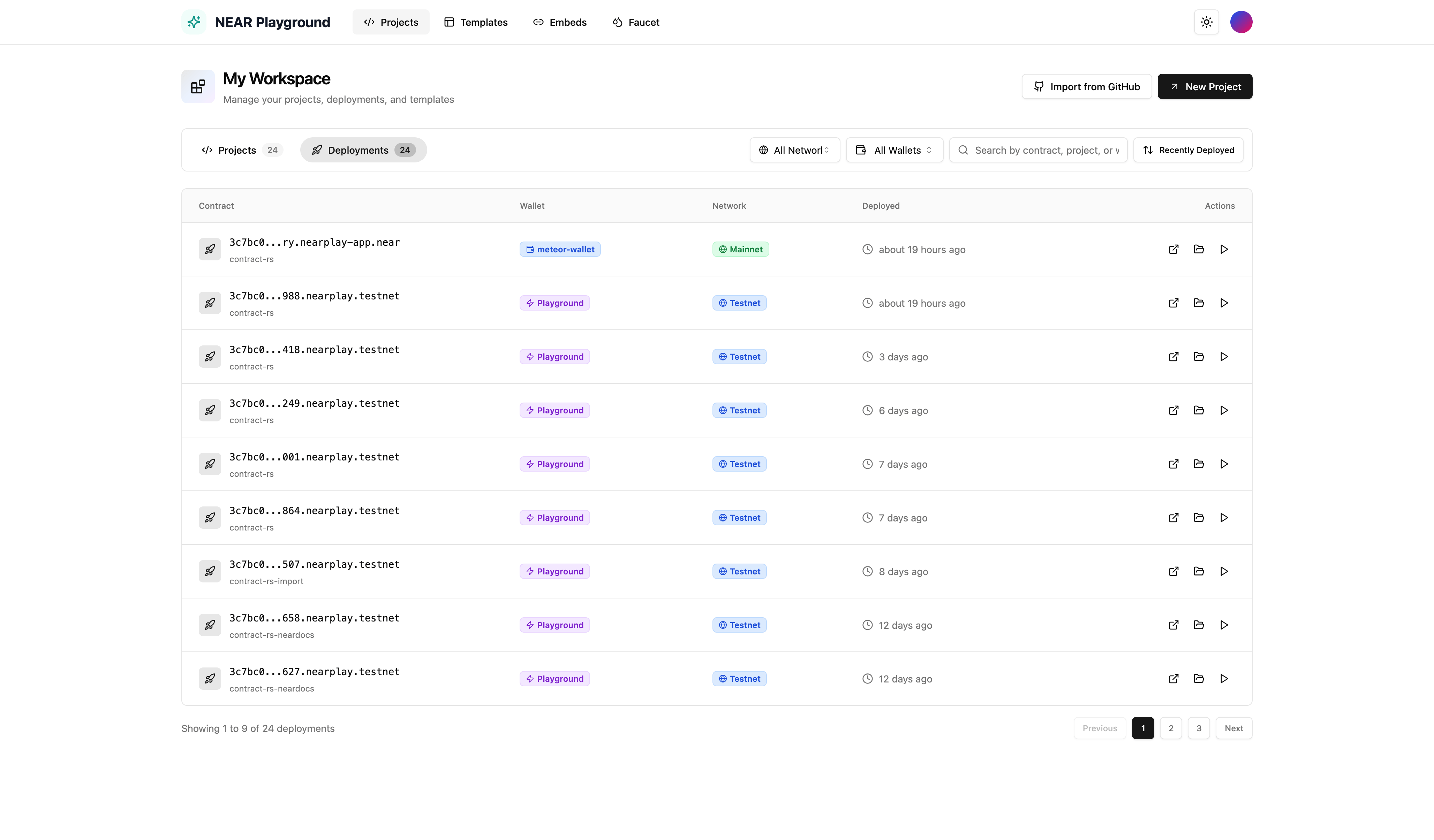
Access your deployment history from the **Deployments** tab in **My Workspace**. This shows all contracts you've deployed across all projects.
 ## Deployment Information
Each deployment row displays:
| Column | Description |
| ------------ | -------------------------------------------------------------------------------------------------- |
| **Contract** | The on-chain contract address (e.g., `abc123.nearplay-app.near`) with the project name shown below |
| **Wallet** | Which wallet was used - **Playground** (built-in wallet) or external wallet like **meteor-wallet** |
| **Network** | **Testnet** or **Mainnet** badge indicating which network the contract is deployed on |
| **Deployed** | Relative timestamp showing when the contract was deployed (e.g., "3 days ago") |
| **Actions** | Quick action buttons for the deployment |
## Actions
Each deployment has three action buttons:
* **View on Explorer** - Open the contract on NearBlocks to see transactions and state
* **Open Project** - Navigate to the project that deployed this contract
* **Call Contract** - Open the contract interface to call methods directly
## Filtering & Search
Use the toolbar to find specific deployments:
* **All Networks** - Filter by Testnet or Mainnet
* **All Wallets** - Filter by wallet type (Playground or external wallets)
* **Search** - Search by contract address, project name, or wallet
* **Sort** - Sort by recently deployed or other criteria
Playground wallet deployments create sub-accounts under `nearplay.testnet` on testnet or `nearplay-app.near` on mainnet. Each deployment gets a unique address.
## Deployment Information
Each deployment row displays:
| Column | Description |
| ------------ | -------------------------------------------------------------------------------------------------- |
| **Contract** | The on-chain contract address (e.g., `abc123.nearplay-app.near`) with the project name shown below |
| **Wallet** | Which wallet was used - **Playground** (built-in wallet) or external wallet like **meteor-wallet** |
| **Network** | **Testnet** or **Mainnet** badge indicating which network the contract is deployed on |
| **Deployed** | Relative timestamp showing when the contract was deployed (e.g., "3 days ago") |
| **Actions** | Quick action buttons for the deployment |
## Actions
Each deployment has three action buttons:
* **View on Explorer** - Open the contract on NearBlocks to see transactions and state
* **Open Project** - Navigate to the project that deployed this contract
* **Call Contract** - Open the contract interface to call methods directly
## Filtering & Search
Use the toolbar to find specific deployments:
* **All Networks** - Filter by Testnet or Mainnet
* **All Wallets** - Filter by wallet type (Playground or external wallets)
* **Search** - Search by contract address, project name, or wallet
* **Sort** - Sort by recently deployed or other criteria
Playground wallet deployments create sub-accounts under `nearplay.testnet` on testnet or `nearplay-app.near` on mainnet. Each deployment gets a unique address.